“The future of 3D modeling is not in manual creation; it is in capturing reality itself.” This insight has transformed how professionals approach digital twins, survey-grade data collection, and 3D reconstruction across industries worldwide.
The journey into 3D modeling has traditionally demanded months of dedicated learning, expensive software licenses, and years of hands-on experience. However, photogrammetry is fundamentally changing this narrative. Rather than spending countless hours mastering complex 3D modeling software interfaces, professionals now capture the built environment directly using drone data and aerial imagery, converting real-world measurements into 1:1 scale digital twins within hours.
Understanding Photogrammetry: The Foundation
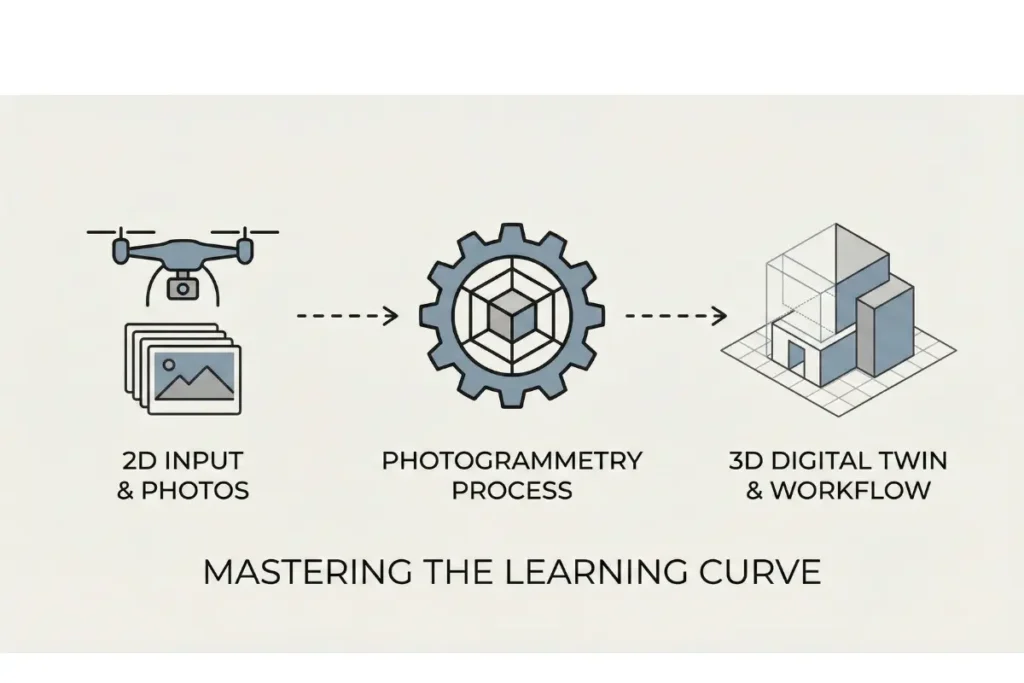
Photogrammetry is a precision measurement technique that extracts three-dimensional spatial data from two-dimensional photographs. Unlike conventional 3D modeling software that requires manual modelling of every surface, photogrammetry captures the actual geometry of buildings, landscapes, and industrial sites. The process analyses multiple overlapping images taken from different angles, automatically calculating the spatial relationships between points to generate a point cloud, which can then be processed into a mesh and refined into professional-grade digital models.
What distinguishes photogrammetry from traditional 3D modeling approaches is its foundation in deterministic algorithms. Rather than relying on artificial intelligence that can introduce hallucinations or inaccuracies into critical data, photogrammetry uses pure mathematical models and physics-based calculations. This means every measurement, every coordinate, and every dimension in your digital twin reflects actual captured reality. For engineering projects, building surveys, and professional rendering applications, this distinction between hallucinated data and measured data is not academic; it directly impacts project outcomes, budgets, and safety compliance.
The technology has evolved dramatically over the past decade. Modern photogrammetry solutions can process survey-grade data collected via drone, smartphone, or professional camera systems, generating point clouds with millimetric accuracy. This is why render-a and similar platforms have made photogrammetry accessible to professionals who previously required specialised training in complex 3D modeling software.
Why the Learning Curve Matters in 3D Modeling
Traditional 3D modeling software presents a formidable learning barrier. Applications like Autodesk Maya, Blender, or Cinema 4D offer extraordinary creative potential, but their interface complexity and steep learning curves mean that newcomers often require six to twelve months of consistent practice before producing publication-quality work. The combination of viewport navigation, rendering engines, material systems, and complex modelling tools creates an ecosystem where small mistakes can waste hours of work.
For professionals who need digital twins quickly rather than slowly acquired modelling skills, this traditional approach represents an inefficient use of time and resources. A surveyor, architect, or site manager does not necessarily need to become a 3D artist; they need accurate, reliable digital representations of physical spaces.
Photogrammetry inverts this dynamic entirely. The learning curve becomes about understanding image capture principles rather than mastering software interfaces. Once you comprehend that photogrammetry requires good image overlap, consistent lighting, and clear subject matter, you can begin collecting data immediately. The processing and refinement of that data happens within automated 3D workflow systems, many of which handle the technical complexity behind the scenes.
The Role of Drone Data and Aerial Imagery
Drones have become the primary capture method for photogrammetry workflows in contemporary practice. Commercial drones equipped with high-resolution cameras can capture hundreds of images of a site in under an hour. This efficiency translates directly to cost savings and faster project timelines. Where traditional site survey methods required ground-based measurement equipment and manual documentation, drone data collection covers large areas systematically and generates consistent, overlap-rich imagery.
Aerial imagery collected from drones provides several advantages for 3D reconstruction. First, it captures bird’s eye perspectives that are impossible from ground level, ensuring complete coverage of roof structures, ground layouts, and topography. Second, modern drones record georeferencing information automatically, meaning your point cloud data arrives with real-world coordinates built in. This integration with survey-grade data standards makes downstream CAD integration straightforward.
For urban planning, infrastructure assessment, archaeological documentation, and property development, the combination of drone data and photogrammetry has become the industry standard. It is faster, more comprehensive, and ultimately more cost-effective than traditional approaches.
From Point Cloud to Digital Twin: The Technical Workflow
The journey from captured images to finished digital twin follows a logical progression. First, the photogrammetry system processes raw imagery to generate a point cloud. A point cloud is a collection of three-dimensional coordinates, each representing a location on the scanned surface. Depending on camera resolution and image overlap, point clouds can contain millions or billions of individual points, creating a dense spatial representation of the surveyed environment.
The next phase involves mesh generation. Rather than working with millions of individual points, which is computationally intensive and difficult to visualize, the point cloud is converted into a continuous surface mesh. This mesh consists of polygonal faces that approximate the underlying geometry, creating a smooth, navigable 3D model.
From the mesh stage, refinement continues. Unwanted noise is removed, gaps are filled intelligently, and the model can be textured using the original photographs. This texture mapping creates photorealistic assets that look like the physical environment itself. These models can then be imported into professional rendering software, CAD systems, or energy simulation platforms like PVSOL for building performance analysis.
What makes this workflow so powerful is automation. Rather than manually creating geometry in 3D modeling software one surface at a time, the entire process from image to mesh to textured model happens algorithmically. This is where the learning curve advantage becomes concrete and measurable.
Accuracy and 1:1 Scale: Why It Matters for Digital Twins
One of the most significant advantages of photogrammetry is its ability to deliver 1:1 scale models. This means every dimension in the digital twin corresponds precisely to the physical world, without scaling errors or approximations. For building information modelling, site surveys, and CAD integration workflows, this accuracy is non-negotiable.
When a digital twin is created through photogrammetry, the resulting model can be directly imported into AutoCAD, Revit, or other professional platforms without requiring manual dimension verification or scaling adjustments. This eliminates one of the most time-consuming and error-prone aspects of traditional 3D modelling workflows. Architects and engineers can immediately begin working with accurate geometry.
Survey-grade data from photogrammetry also enables precise measurement and analysis. Want to calculate material quantities for renovation projects? The accuracy of the 3D model allows for precise volume and surface area calculations. Planning energy efficiency upgrades? Tools like PVSOL can work directly with photogrammetry-generated models to simulate solar exposure and thermal performance with genuine building geometry.
This level of accuracy comes from the deterministic nature of photogrammetric algorithms. Unlike artificial intelligence systems that approximate and interpolate, photogrammetry relies on rigid mathematical principles derived from computer vision and physics. Each point in the resulting model is calculated, not guessed.
Beginner Tips for Starting Your Photogrammetry Journey
If you are new to photogrammetry, these foundational principles will help you avoid common pitfalls and begin producing quality results quickly.
Image Capture and Overlap
The quality of your final model depends entirely on the quality of your source images. Plan your capture to ensure at least 60 percent overlap between consecutive images. This overlapping area is how the photogrammetry engine calculates spatial relationships and builds the point cloud. Systematic image capture, whether from a drone following predefined flight paths or from careful manual documentation of complex structures, always outperforms haphazard photography.
Lighting Conditions
Consistent, even lighting produces better results than harsh shadows or extreme backlighting. Overcast days provide the most uniform illumination for photogrammetry capture. If you must photograph in variable light, ensure you capture multiple passes to obtain consistent coverage of all surfaces. Reflective surfaces, glossy materials, and transparent objects can sometimes challenge photogrammetry algorithms, so particular care should be taken with glass facades or highly reflective industrial equipment.
Understanding Point Cloud Density
Denser point clouds contain more spatial information but require more computational resources to process and store. For many applications, a point cloud with millions of points provides sufficient accuracy and detail. However, projects requiring millimetric precision for engineering purposes may benefit from even denser data. Early in your workflow, capture at the highest practical resolution, then reduce density as needed for specific applications.
Ground Control Points and Georeferencing
For professional survey-grade data, incorporate ground control points into your capture workflow. These are marked locations in the physical environment whose coordinates are independently verified using surveying instruments. By including these points in your photogrammetry processing, you can achieve absolute georeferencing and eliminate scaling ambiguities. Modern drones with integrated GPS provide basic georeferencing; adding ground control points elevates accuracy to professional survey standards.
[IMAGE: An example of correctly captured photogrammetry imagery showing overlapping aerial photographs of an industrial site with visible overlap regions highlighted]
Photogrammetry Versus Traditional 3D Modeling Software
This is not an argument that traditional 3D modeling software has become obsolete. Rather, it is a recognition that different tools serve different purposes within a comprehensive 3D workflow.
Traditional 3D modeling software excels at creative visualisation, complex geometry creation, and custom design iteration. When you need to design new structures, explore architectural alternatives, or create fantastical visualisations, applications like Autodesk’s ecosystem remain essential. However, they require deep user expertise and substantial time investment per project.
Photogrammetry excels at capturing existing reality with minimal learning overhead and delivering accurate, photorealistic assets within hours. Once you have a photogrammetry-generated model in hand, you can import it into your chosen 3D modeling software for further refinement, annotation, or integration with design elements. The combination of photogrammetry for data capture and traditional software for design iteration represents the modern professional 3D workflow.
This complementary relationship has created the automated 3D workflow that studios and professional practices now rely on. Data comes in via photogrammetry, is refined in CAD or specialised 3D software, then is deployed for rendering, analysis, or construction planning. The learning curve for professionals narrows considerably because they focus on their domain of expertise rather than becoming generalists across multiple complex software platforms.
Integration with Professional Tools and Platforms
One reason photogrammetry has become essential to modern 3D workflow is its seamless integration with the tools professionals already use daily.CAD Integration and AutoCAD Compatibility
Photogrammetry-generated models import directly into AutoCAD and other CAD platforms as precision geometry. Architects and engineers can overlay the photorealistic digital twin onto existing floor plans, verify dimensions, identify clashes, and plan renovations with complete spatial confidence. This CAD integration eliminates the manual remodelling step that traditional photogrammetry workflows once required.
Energy Modeling and PVSOL
Tools like PVSOL depend on accurate building geometry to simulate solar radiation, panel performance, and thermal dynamics. Photogrammetry-generated 3D models provide this geometry with the precision required for meaningful energy analysis. Rather than spending days creating a simplified model in traditional 3D modeling software, you can import a photogrammetry-derived digital twin and immediately begin running simulations.
Professional Rendering and Visualisation
Photorealistic assets generated through photogrammetry contain geometric accuracy and texture information derived directly from reality. When rendered in professional rendering engines, these models produce marketing materials, planning documents, and design studies that clients instantly recognise. The photorealism is genuine because it is captured from actual surfaces and lighting, not artistically approximated.
[IMAGE: A screenshot showing a photogrammetry-derived building model imported into AutoCAD, displaying seamless CAD integration with dimensional annotations]
Digital Twins: From Concept to Reality
The term digital twin refers to a comprehensive digital representation of a physical asset that mirrors its geometry, materials, and sometimes its operational characteristics. Creating digital twins has historically been labour-intensive, requiring months of 3D modeling work. This is where photogrammetry has revolutionised the field.
A digital twin created through photogrammetry captures the current state of a building, facility, or landscape with complete accuracy. This model becomes the foundation for multiple downstream applications: facility management systems can use it to track maintenance histories, architectural teams can use it for renovation planning, and engineers can use it for structural analysis. The initial investment in photogrammetry capture pays dividends across numerous use cases.
Moreover, because photogrammetry captures data quickly, creating updated digital twins as facilities change becomes practical. Annual or even quarterly updates to your digital representation maintain information relevance, supporting dynamic facility management approaches that would be impossible with static, manually-created models.
This is the vision driving adoption of photogrammetry in enterprise settings: comprehensive, accurate, regularly-updated digital representations of the physical built environment, created efficiently and integrated seamlessly into existing professional workflows.
Addressing Common Misconceptions
Several misconceptions persist around photogrammetry, often rooted in comparing it to outdated approaches or misunderstanding its capabilities.
Photogrammetry Versus AI Generated Models
A critical distinction exists between photogrammetry and artificial intelligence image analysis. Photogrammetry relies on deterministic algorithms rooted in mathematics and physics. Every coordinate in a photogrammetry point cloud is calculated from measured image data, not generated or hallucinated. Conversely, AI systems, whilst powerful for many applications, can introduce artefacts, incorrect details, or impossible geometries into generated models. For engineering, survey, and mission-critical applications, the certainty of photogrammetry outweighs the convenience of AI approximation.
Quality Limitations
Some assume photogrammetry produces lower-quality results than manual 3D modeling. This misunderstands the technology’s purpose. Photogrammetry captures reality as it exists; the quality of the output is genuinely photorealistic because it is derived from photography. Manual 3D modeling software creates approximations of reality based on artist interpretation. For existing structure documentation, photogrammetry is inherently superior. For creative design work, traditional software remains more flexible.
Cost Assumptions
The perception that photogrammetry requires expensive specialised equipment is outdated. Whilst professional-grade solutions offer significant advantages, modern smartphones and consumer drones can produce excellent photogrammetry results. The processing software often costs far less than licenses for traditional 3D modeling platforms. The real savings come from time reduction and elimination of manual rework.
The Future of 3D Workflow and Professional Practice
As photogrammetry technology becomes more sophisticated and its processing more automated, the trajectory is clear. The future 3D workflow will centre on rapid reality capture using photogrammetry as the primary data source, with traditional 3D modeling software serving as refinement and specialisation tools for specific applications.
This shift has profound implications for professional education and career development. Rather than demanding that architects, engineers, and surveyors become experts in complex 3D modeling interfaces, their training can focus on understanding photogrammetry principles, camera techniques, and data quality assurance. The learning curve for productive 3D work shrinks from months to weeks.
Organisations implementing automated 3D workflow approaches report substantial improvements in project delivery speed, cost reduction, and data accuracy. These are not marginal improvements; they represent fundamental changes in how professional practices operate.
Getting Started with Photogrammetry: Practical Next Steps
If you are considering photogrammetry for your projects, the path forward involves assessment, testing, and gradual integration.
First, identify a suitable pilot project. This might be a small building survey, a site documentation task, or a digital twin creation project. The goal is to experience the workflow yourself rather than relying on theoretical understanding. Many platforms offer test projects with significantly reduced costs, allowing you to evaluate photogrammetry’s fit with your specific needs.
Second, invest time in understanding image capture best practices. Attend webinars, review case studies, and experiment with different capture approaches. The quality of your source imagery directly determines your output quality, making capture technique a fundamental skill.
Third, explore integration with your existing tools and workflows. How does photogrammetry-generated data connect with your CAD platforms, rendering software, or analysis tools? Early integration testing prevents surprises when you move to production use.
Finally, build relationships within professional communities exploring photogrammetry. Online forums, professional associations, and social networks dedicated to 3D technology offer valuable insights from practitioners who have travelled this path ahead of you.
Frequently Asked Questions
What is photogrammetry and how does it differ from 3D scanning?
Photogrammetry extracts three-dimensional coordinates from two-dimensional photographs using mathematical algorithms. 3D scanning, conversely, uses laser or structured light technology to directly measure surfaces. Photogrammetry is often more practical for large-scale projects, exterior documentation, and scenarios where portability matters. Both approaches produce point clouds that can be refined into digital twins, but photogrammetry relies solely on imagery whilst 3D scanning requires specialised hardware.
How accurate is photogrammetry compared to traditional survey methods?
Modern photogrammetry can achieve millimetric accuracy when conducted professionally with proper ground control points and calibrated equipment. Traditional survey instruments like total stations or GPS systems remain more precise for specific control measurements, but photogrammetry provides greater spatial coverage and detail. The two methods complement each other; many professional workflows incorporate ground control points from traditional surveying into photogrammetry processing to achieve both precision and comprehensive spatial data.
Can photogrammetry work in poor lighting conditions?
Photogrammetry depends on visible features in photographs, so extremely poor lighting creates challenges. However, modern cameras with high ISO sensitivity and processing algorithms that handle noise effectively have expanded the practical operating conditions. Overcast conditions, which provide even illumination without harsh shadows, remain ideal. For interior spaces, supplemental artificial lighting dramatically improves results. Professional photogrammetry practices often plan capture sessions around optimal lighting windows.
How long does a typical photogrammetry project take from capture to final model?
Image capture itself typically takes hours, depending on site size and complexity. Processing time for generating point clouds and meshes varies based on image volume and hardware capability, ranging from hours to days for large projects. Refinement, texturing, and integration with CAD systems may add additional time. However, the total timeline from site visit to usable digital twin frequently completes within 24 to 48 hours for medium-scale projects, dramatically faster than traditional 3D modeling approaches.
What equipment is required to begin photogrammetry?
At minimum, you require a camera capable of recording high-resolution images and photogrammetry processing software. Consumer drones starting at a few hundred pounds provide excellent entry-level capture platforms. Professional setups may include calibrated cameras, multiple lenses, stabilisation equipment, and surveying instruments for ground control points. Processing software ranges from free open-source solutions to enterprise platforms with extensive automation features. Starting with accessible entry-level equipment allows learning before investing in professional-grade systems.
How does photogrammetry integrate with AutoCAD and other professional software?
Photogrammetry-generated point clouds and meshes export in standard formats such as LAS, E57, and OBJ that AutoCAD, Revit, and specialised 3D software support natively. The models can be imported as reference geometry, converted to CAD entities, or used as underlying spatial context for design work. This integration enables seamless workflows where photogrammetry captures existing conditions and CAD tools handle design iteration and documentation.
Is photogrammetry suitable for interior spaces?
Yes, photogrammetry works effectively for interior spaces with appropriate technique. Interior capture requires more careful image planning because you cannot view spaces from external vantage points. Systematic room-by-room documentation with careful overlap between images ensures complete coverage. Supplemental lighting improves results in dimly lit interiors. Digital twins of buildings often combine exterior drone-based photogrammetry with interior ground-based capture to create comprehensive spatial models.
What is a point cloud and why is it important in photogrammetry?
A point cloud is a collection of three-dimensional coordinate points calculated from overlapping photographs. Each point represents a location on the photographed surfaces, collectively creating a dense spatial representation of the environment. Point clouds are important because they preserve the complete spatial data captured by photogrammetry before processing into simplified mesh models. Point clouds enable precise measurement, enable detection of small details, and serve as the foundation for generating refined meshes, textures, and digital twins.
Your Path Forward in 3D Modeling
The learning curve advantage is genuine and measurable. Rather than mastering complex 3D modeling software, you learn photogrammetry principles and image capture techniques. Rather than spending weeks manually modelling geometry, you capture reality and let algorithmic processing handle model creation. Rather than approximating dimensions, you work with survey-grade data and 1:1 scale digital twins that integrate seamlessly with professional tools like AutoCAD, PVSOL, and standard rendering platforms.
For architects, engineers, surveyors, facility managers, and countless other professionals, photogrammetry represents the future of the 3D workflow. The question is not whether to adopt it, but how quickly to integrate it into your practice.
If you are ready to experience this transformation firsthand, explore our complete 3D modeling solutions on the render-a platform. For specific applications in land surveying and digital documentation, our 3D land surveying solutions demonstrate how photogrammetry delivers professional results in production environments.
Join our growing community of professionals discovering how photogrammetry accelerates their 3D workflows. Connect with us on YouTube for technical tutorials and case studies, or engage with our professional community on LinkedIn to share your experiences and learn from industry leaders. Your 3D modeling future starts today.