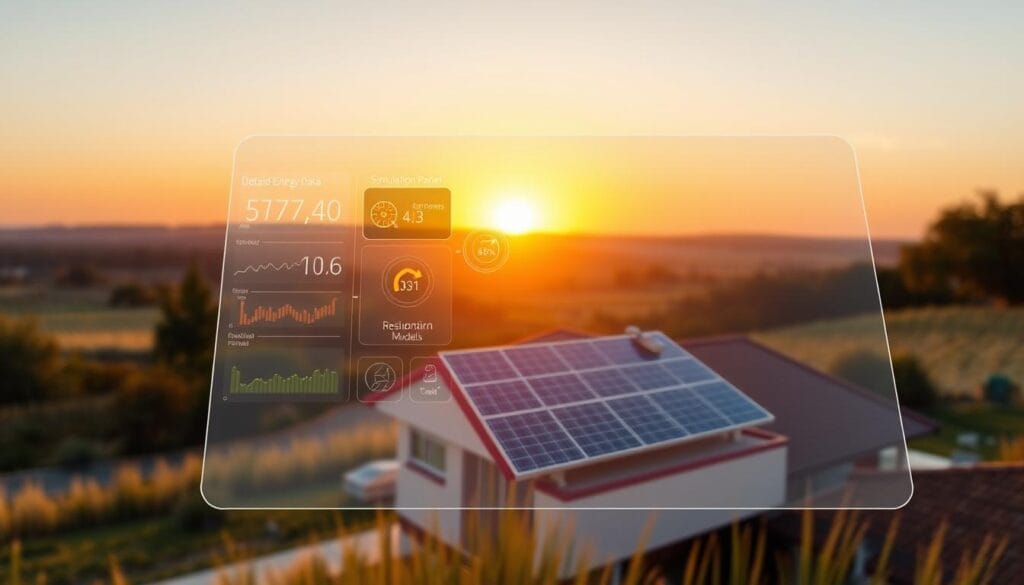
Effective solar energy system design demands both technical accuracy and the ability to envision the final outcome. PVSOL stands as a robust tool for designing solar systems. Yet, its full capability is realized when combined with Render-a’s advanced visualization tools.
By merging PVSOL’s technical prowess with Render-A’s photorealistic rendering, solar experts can transform schematic layouts into vivid, sales-enhancing visuals. This synergy boosts solar project proposals, simplifying the communication of a project’s value to clients and stakeholders.
Key Takeaways
- Combining PVSOL and Render-A enhances solar project proposals.
- Render-A’s visualization capabilities bring PVSOL designs to life.
- The integration improves client communication and stakeholder engagement.
- Photorealistic rendering drives sales by showing project possibilities.
- Effective visualization aids in securing project approvals.
The Evolution of Solar Design Visualization
The visualization of solar projects has seen a significant transformation, reshaping the renewable energy sector. This change is mainly due to the progress in renewable energy software and photovoltaic project planning tools.
From Technical Drawings to Photorealistic Renderings
The shift from technical drawings to photorealistic renderings has been a major breakthrough in solar design visualization. This evolution allows stakeholders to grasp and connect with proposed projects more effectively.
- Enhanced project comprehension through detailed visualizations
- Improved stakeholder engagement due to realistic representations
- Better project sales through compelling visual presentations
Why Visual Communication Matters in Solar Sales
In solar sales, effective visual communication is vital. It directly influences the ability to secure project approvals and investments. Photorealistic renderings and advanced visualizations are essential in this endeavor.
The Technical-Visual Gap in Modern Solar Planning
Despite the progress, a technical-visual gap remains in solar planning. Closing this gap requires merging technical accuracy with visual appeal. Modern renewable energy software strives to overcome this challenge.
PVSOL Projects: Technical Capabilities and Limitations
For solar engineers, grasping PVSOL’s technical strengths and weaknesses is key. It’s vital for optimizing its use in solar panel simulation and PV system modeling.
Core Simulation Features for Solar Engineers
PVSOL boasts advanced simulation tools for thorough solar project analysis. It includes shading analysis, electrical design, and performance prediction capabilities.
Accuracy and Reliability of PVSOL Calculations
The precision of PVSOL’s calculations is critical for dependable project planning. It employs sophisticated algorithms to mimic real-world scenarios. This ensures accurate energy output forecasts.
Visualization Constraints in Client Presentations
Though PVSOL shines in technical simulations, its visualization tools have their limits. Engineers must find a balance between detailed technical information and engaging visuals for client presentations.
By comprehending these aspects, solar engineers can leverage PVSOL for both technical analysis and client communication. This improves the efficiency of solar project development.
Render-a: a Comprehensive Review for Solar Visualization
Render-a empowers solar engineers to turn complex data into engaging visuals. This transformation turns standard proposals into concrete promises. In the solar sector, visualization is vital for client presentations and securing project approvals.
Key Features and Capabilities
Render-a offers a suite of features essential for solar planning. It seamlessly imports PVSOL models, fitting into existing workflows. Its advanced rendering capabilities produce photorealistic images and animations. These enhance the visual communication of solar designs.
User Interface and Learning Curve
The interface of Render-A is intuitive, welcoming both beginners and experts. Though there’s a learning curve, extensive tutorials and support resources expedite user proficiency.
Performance and System Requirements
Render-a’s performance is optimized for various hardware setups, with high-end graphics cards recommended for detailed projects. The software’s system requirements are clearly stated, ensuring compatibility with most contemporary workstations.
Pricing and Value Proposition
Render-A’s pricing is competitive in the solar visualization market. Its value to solar professionals, by adding advanced visualization to PVSOL software features, is evident. It significantly boosts project presentations and proposals, impacting sales and approvals.
Why PVSOL and Render-A Form the Perfect Partnership
The union of PVSOL and Render-A marks a major leap in renewable energy project management. It combines technical prowess with visual excellence. This alliance is vital for solar experts. They must manage the project’s technical side while presenting a clear, visual plan to clients.
Complementary Strengths and Capabilities
PVSOL shines in technical simulations and analyses. Render-a, on the other hand, turns these models into stunning visuals. Together, they cover all phases of solar project development, from design to client presentation.
Technical Precision Meets Visual Persuasion
PVSOL ensures solar projects are optimized for performance and feasibility. Render-A’s visuals make these projects attractive and easy to understand for clients. This blend boosts the effectiveness of project proposals.
Workflow Integration Possibilities
Combining PVSOL and Render-A into one workflow simplifies project development. Users can easily transfer models from PVSOL to Render-A. This creates a seamless, efficient process that saves time and enhances project success.
Preparing Your PVSOL Models for Export
To ensure a seamless transition of your PVSOL projects to Render-A, it’s essential to prepare your models meticulously. A well-structured model simplifies the export process and enhances visualization quality.
Model Organization Best Practices
Organizing your PVSOL model is the first step towards a successful export. This involves grouping related components together and using layers to differentiate between various parts of the solar energy system design. As
“A well-organized model is the backbone of efficient project management and visualization.”
- Use clear and descriptive names for components and groups.
- Utilize layers to categorize different elements of your design.
- Keep your model structured to facilitate easier navigation and modification.
Level of Detail Considerations
The level of detail in your PVSOL model significantly impacts the export and subsequent rendering in Render-A. Striking the right balance is key.
Pre-Export Optimization Checklist
Before exporting your model, ensure you have:
- Checked for and resolved any errors or warnings in your PVSOL project.
- Optimized your model’s complexity for the intended visualization.
- Verified that all necessary components are included and correctly configured.
By following these guidelines, you can ensure that your PVSOL models are well-prepared for export to Render-A. This results in high-quality visualizations that effectively communicate your solar energy system designs.
Technical Workflow: Exporting from PVSOL to Render-A
To effectively visualize photovoltaic project planning, understanding the export process from PVSOL to Render-A is key. This process allows solar engineers to combine the strengths of both tools. It results in detailed, visually appealing solar panel simulations.
Supported File Formats (.obj) and Their Differences
PVSOL offers export options in .3ds and .obj formats. The .3ds format is popular for 3D modeling and works well with Render-A. In contrast, .obj is more flexible, suitable for complex geometries and textures. It’s perfect for detailed solar panel simulations.
Step-by-Step Export Process
Exporting from PVSOL to Render-a is straightforward:
- Ensure your PVSOL model is scaled and oriented correctly.
- Choose the export format (.obj) based on your needs.
- Export the model from PVSOL, keeping the chosen format.
- Import the file into Render-a, adjusting settings for the best visualization.
Preserving Model Integrity and Scale
It’s vital to check the exported model’s scale and dimensions in Render-a. This step ensures the visualization accurately reflects the original PVSOL model.
Troubleshooting Common Export Issues
Common export problems include detail loss or scaling errors. To fix these, ensure PVSOL’s export settings align with Render-A’s import settings. Also, check for software updates to address compatibility issues.
Mastering the Render-a Import Process
To create accurate solar energy planning tool visualizations, mastering the Render-A import process is essential. This step is critical in leveraging PVSOL models for compelling presentations.
Setting Up Your Render-A Project Environment
Before importing PVSOL assets, ensure your Render-A project environment is properly set up. This includes configuring the correct units, scale, and initial rendering settings that match your PVSOL project’s specifications.
Importing PVSOL Assets: Complete Walkthrough
The import process begins with exporting your PVSOL model in a compatible format, such as .3ds or .obj. Render-A supports both, but .3ds is preferred for complex pv system modeling projects. Once exported, use Render-A’s import function, selecting the appropriate options to preserve model integrity and scale.
Handling Geometry and Texture Challenges
After importing, you may encounter geometry or texture issues. Common problems include missing textures or distorted model parts. Addressing these requires adjusting import settings or manually applying textures within Render-A.
Post-Import Optimization Techniques
To optimize your imported model, simplify complex geometries where possible, and adjust texture mappings to enhance rendering performance without compromising visual quality.
By mastering these steps, you can ensure a smooth transition of your PVSOL models into Render-A, improving your solar energy planning tool visualizations.
Transforming Technical Models into Sales Tools
Technical models can be transformed into compelling sales visuals with the right techniques. This process involves several key steps. These steps enhance the visual appeal and persuasive power of your PVSOL models when integrated with Render-A.
Adding Photorealistic Materials and Textures
Adding photorealistic materials and textures is a critical first step. This significantly enhances the visual quality of your renderings. It makes them more relatable and engaging for your clients. Industry experts note that photorealistic renderings can increase client understanding and approval rates by up to 30%.
“The use of photorealistic renderings can increase client understanding and approval rates by up to 30%.”
Render-A allows you to apply a wide range of materials and textures. This ensures your models closely resemble real-world conditions.
Environmental Settings for Different Times and Seasons
Adjusting environmental settings is key for creating diverse and contextually relevant visualizations. Render-A enables you to simulate various times of day and seasons. This provides a complete view of how your solar project will look and perform under different conditions.
- Adjust lighting to simulate different times of day
- Change seasonal settings to show project performance year-round
- Use weather conditions to demonstrate project resilience
Camera Angles and Composition for Maximum Impact
The choice of camera angles and composition is vital for your visualizations’ effectiveness. By selecting the right perspective, you can highlight key features of your project. This creates a lasting impression on your audience.
Before-and-after visualizations are a powerful tool for demonstrating your solar projects’ impact. By comparing the state of a site before installation with the after-installation scenario, you can clearly show the benefits and value of your project.
- Create a before scene with Render-a’s environmental settings
- Design the after scene with your solar installation
- Compare the two scenes to highlight project benefits
By following these steps and leveraging Render-A’s capabilities with PVSOL, you can transform your technical models into effective sales tools. These tools drive engagement and conversion in renewable energy project management.
Advanced Visualization Techniques for Solar Proposals
To elevate solar proposals, professionals can leverage advanced visualization techniques in Render-A. These techniques not only enhance the visual appeal of the proposals but also provide a clearer understanding of the solar energy system’s design and functionality.
Visualizing Energy Production Data
One of the key advanced visualization techniques is the ability to visualize energy production data. This involves creating interactive 3D models that can display real-time or simulated energy production data. By doing so, stakeholders can better understand the solar energy system’s energy output.
- Display real-time energy production data
- Simulate energy production for different weather conditions
- Compare energy production across different system configurations
Creating Animated Solar Path Studies
Another powerful technique is creating animated solar path studies. These animations demonstrate how sunlight interacts with the solar panels throughout the day and across different seasons. This visualization helps in understanding the efficiency and any shading issues of the solar installation.
Developing Interactive Presentation Elements
Developing interactive presentation elements is key for engaging clients and stakeholders. Render-A allows users to create interactive 3D models that can be manipulated in real-time. This provides a more immersive experience.
Integrating Technical Annotations with Visual Elements
To further enhance proposals, integrating technical annotations with visual elements is essential. This involves adding detailed notes and specifications directly onto the 3D model or visualization. It makes it easier for viewers to understand the technical aspects of the solar energy system design.
- Add annotations to highlight key features
- Use callouts to provide additional technical information
- Link to external resources for more detailed specifications
Real-World Applications: Case Studies and Examples
The fusion of PVSOL’s technical prowess with Render-a’s visualization capabilities is revolutionizing the solar industry. It’s changing how projects are planned and presented to clients. This synergy enables professionals to craft detailed, engaging proposals. These proposals boost client comprehension and sales.
Residential Solar Installation Visualization
Render-A’s integration with PVSOL models has elevated residential client presentations. A notable example is a rooftop solar installation in California. Render-a created a photorealistic model of the system. This visualization helped the homeowner grasp the project and streamlined the sales process.
Commercial Solar Farm Presentation
Visualizing a commercial solar farm’s landscape impact is essential. A study in Nevada showed Render-A’s visualizations alleviated community concerns. They provided a clear view of the project’s scope and design.
Industrial Rooftop Array Proposal
Industrial rooftop arrays face unique challenges, like complex geometries and layouts. A New York case study highlighted PVSOL and Render-A’s collaboration. They modeled and visualized a rooftop array, considering existing infrastructure and shading issues.
Measuring Conversion Rate Improvements
The visualizations’ effect on conversion rates is substantial. Key statistics from the studies reveal:
- 25% increase in sales proposals accepted
- 30% reduction in sales cycle time
- 95% client satisfaction rate with the visualization process
These figures highlight the importance of combining PVSOL and Render-A in solar project planning.
Optimizing Your Workflow Between PVSOL and Render-a
Improving your workflow between PVSOL and Render-A can greatly boost your efficiency in solar panel simulation projects. By adopting a few essential strategies, you can streamline your pv system modeling. This will enhance your overall productivity.
Time-Saving Techniques for Regular Users
For those who frequently use PVSOL and Render-A, several time-saving methods are available. These include:
- Creating standardized templates for common project types
- Utilizing keyboard shortcuts in both PVSOL and Render-A
- Automating repetitive tasks through scripting
Template Creation for Consistent Branding
Creating templates for Render-a projects is key to maintaining consistent branding in your solar proposals. This involves:
- Standardizing camera angles and lighting setups
- Creating a library of commonly used materials and textures
- Incorporating company logos and branding elements
Team Collaboration Best Practices
Effective team collaboration is essential for complex solar panel simulation projects. Best practices include:
- Establishing clear communication channels
- Using version control for project files
- Defining roles and responsibilities within the team
Quality Control Processes for Technical Accuracy
To ensure technical accuracy in your solar design visualizations, implement the following quality control processes:
- Regularly check model integrity after import/export
- Verify that all components are correctly scaled
- Validate simulation results against real-world data
Elevating Solar Proposals Through Integrated Visualization
The fusion of PVSOL and Render-A marks a major leap forward in solar energy planning. It empowers experts to craft detailed, persuasive proposals. By merging PVSOL’s technical prowess with Render-A’s advanced visualization, users can showcase the worth of their solar initiatives effectively.
This partnership enables the creation of lifelike renderings and animations. These can engage clients and stakeholders, boosting the adoption of renewable energy software. The seamless workflow between PVSOL and Render-A streamlines design and presentation, saving time and fostering better team collaboration.
As the solar sector advances, the need for compelling, data-driven visuals will grow. By harnessing the capabilities of PVSOL and Render-a, professionals can enhance their solar proposals. This not only improves client engagement but also fuels the expansion of the renewable energy market.
Let’s Contact Us : LinkedIn
To see how Render-a work’s, take a look at our Youtube videos.