

The first time a client’s lead engineer sent back our output with “this doesn’t open in our system,” we had already onboarded 40+ engineering teams at Render-a. That should have been embarrassing. Instead, it became the single most useful bug report we ever received because it wasn’t about our 3D accuracy. It was about a mismatched IFC schema version between our export and their BIM platform. The model was structurally flawless; it just couldn’t talk to their software.
That distinction “the data is right” vs. “the data is usable” is the gap most buyers don’t discover until after they’ve signed an enterprise contract. When evaluating new 3D modeling software, you are not just buying an accuracy engine; you are betting on its pipeline compatibility. This guide is built directly from the workflow integration failures we’ve actually hit (and resolved) across roughly 200 solar and construction engineering pipelines since 2024, showing how we developed the current Render-a technical standards.
The Reality Check: Native Formats vs. Generic Wrappers
To understand why integrations break, we have to look at how data behaves when it leaves the modeling platform and enters your production tools:
| Downstream Target | What Sales Reps Promise | The Practical Reality (Render-a Standard) |
| CAD (AutoCAD/BricsCAD) | “We export standard files.” | Generic lines lose scale. You need true, native DXF/OBJ layer separation. |
| Solar Design (PVSOL/PVsyst) | “It opens as a 3D mesh.” | Massive meshes crash the system. You need lightweight, obstruction-aware shading layers. |
| BIM (Revit/Allplan) | “Fully IFC compatible.” | Strips metadata. You need exact schema matching (IFC4 or IFC2x3) to retain properties. |
| Onboarding Timeline | “Zero-day deployment.” | Requires retraining. True zero overhead means matching your current file delivery format. |
What 3D modeling tools integrate seamlessly with existing workflows without implementation overhead?
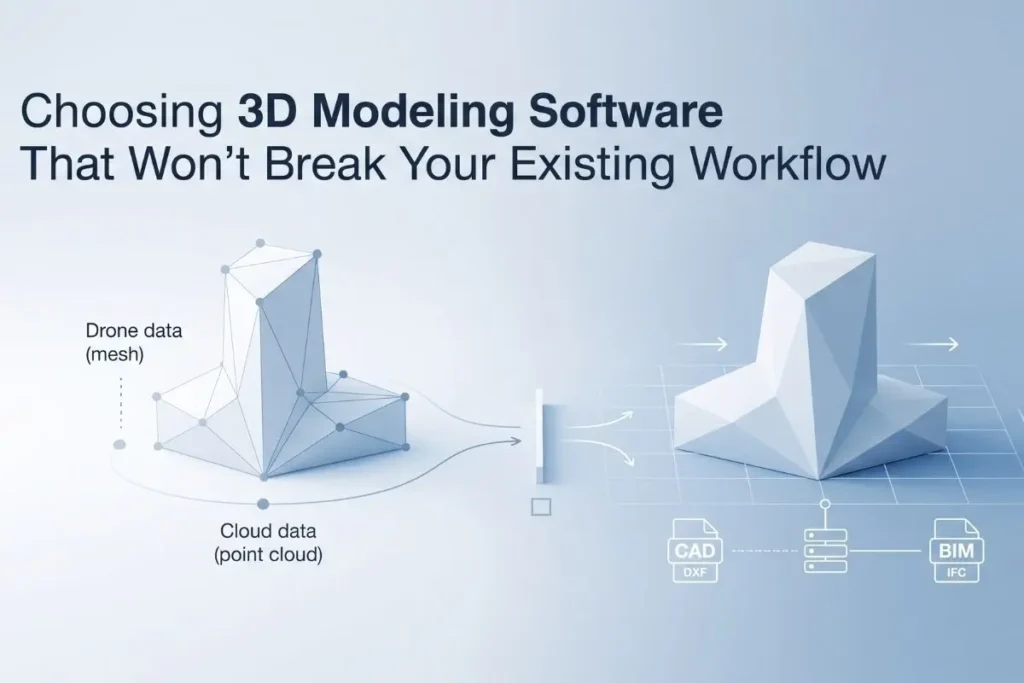
In practice, 3D modeling tools only integrate seamlessly if they export to the native, uncorrupted formats your downstream production software expects out of the box, completely eliminating intermediate file conversion steps. For industrial solar and civil engineering pipelines, true integration means the software outputs production-ready DXF/OBJ files for CAD utilities, lightweight obstruction geometries for specialized shading engines like PVSOL, and strict IFC models for BIM environments. At Render-a, we built our native export engine because early versions only supported a generic OBJ mesh a shortcut that lost us two major enterprise pilots in 2024 because the clients’ BIM managers couldn’t get structural metadata to survive the round-trip through their existing software. True zero-overhead deployment does not mean there is no setup at all; it means your engineering team’s very first export from the Render-a platform fits into their daily production routine without a support ticket or a manual workaround.
Can I improve product standardization with duplicate 3D model detection software?
Product standardization across a scaling engineering department is usually a much larger bottleneck than raw measurement precision. On a 12-person solar engineering team we onboarded to the Render-a ecosystem in late 2025, the core issue wasn’t mathematical error it was that three different draftsmen had independently generated 3D models for the exact same commercial client’s roof over an 18-month period simply because the company lacked a reliable method for checking if the building had already been digitized. Implementing dedicated duplicate 3D model detection software resolves this operational drain by utilizing a project-level hash check tied securely to real-world GPS coordinates and building footprints, automatically flagging a duplicate before the system wastes resources generating a new asset. If your current modeling pipeline lacks this capability, a practical workaround we recommend before you switch to Render-a is forcing your team to tag every single export file with its exact site coordinates right in the filename rather than just the client’s name; it is a crude fix, but it organizes a shared drive faster than most project managers expect.
Where the Pipeline Still Requires a Human in the Loop
We refuse to pretend that modern asset generation is fully automated from end to end. No matter how advanced the Render-a software engine is, two distinct engineering scenarios still require mandatory human validation on every live project to guarantee successful workflow integration:
- Non-Standard Roof Geometries: When dealing with complex sawtooth designs, curved historical profiles, or roofs heavily cluttered with custom ventilation systems, automated photogrammetry meshes are typically 90% accurate. However, the Render-a delivery pipeline still mandates that an experienced technician manually verify the obstruction bounding boxes before exporting the file into a formal commercial proposal.
- Legacy CAD Alignment: If a client provides an older site layout plan that completely lacks modern georeferencing or real-world coordinate tags, matching the new 3D model to their existing document requires a brief manual alignment step. We have yet to find an automated tool including our own platform that bypasses this constraint without human oversight.
Frequently Asked Questions
Does switching 3D modeling software require retraining my whole team? Not if the software’s export engine natively outputs the precise file formats your team already handles daily. Our deployment data shows that designers who are already fluent in systems like AutoCAD or SketchUp can actively utilize Render-a exports within a single working day; the actual learning curve is entirely on the drone data capture side, not inside the CAD environment.
How do I know if a 3D modeling tool will actually fit my workflow before I commit? Never rely on a software vendor’s pre-rendered demo environment. Request a raw file export generated from one of your own active project sites during the trial phase, and attempt to open it directly inside your team’s everyday production software. If the file requires an external conversion plugin or drops critical surface metadata, it will not fit your pipeline.
What causes duplicate or inconsistent 3D models across an engineering team? This operational friction is almost always caused by the absence of a centralized, coordinate-based registry for past projects rather than a technical flaw within the modeling software itself. Integrating a platform like Render-a that enforces a single source of truth based on geographical location completely eliminates redundant drafting work.