


Render-a Guide: Project Output, Reporting, and Integrations
Export to OBJ, DWG, DXF, SKP, and PV*SOL, then build technical reports, carbon figures, and customer proposals from the same project.
Export Formats
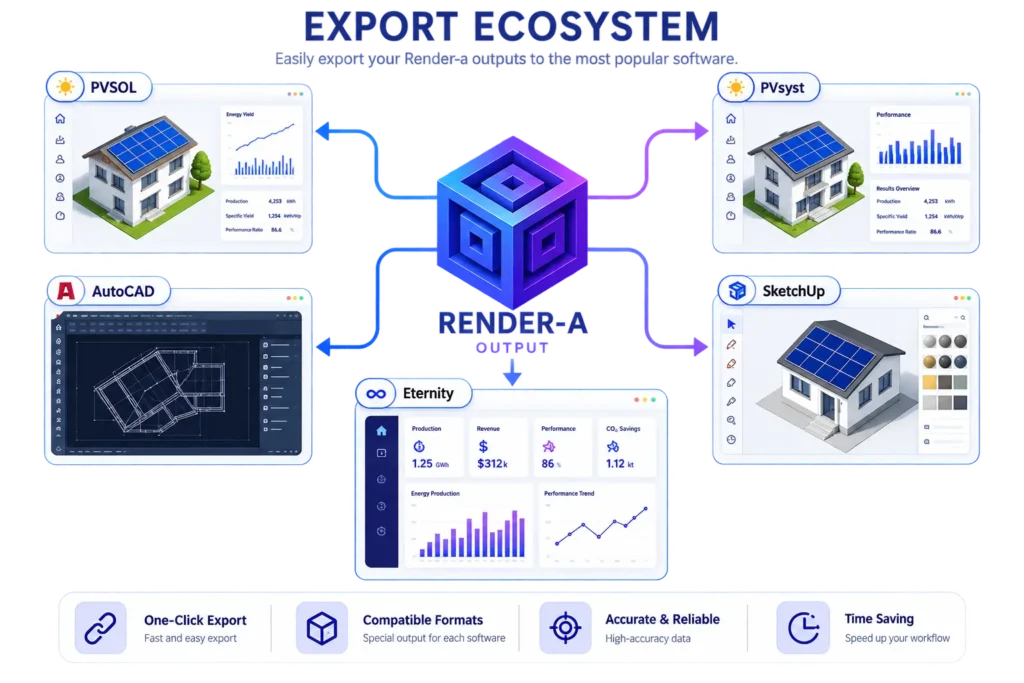
Output formats available on your account can be downloaded from the OUTPUT area in the project details. The supplied technical document lists OBJ, DAE, SKP, DWG, DXF, TIFF, and PVSOL formats.
| Target | Recommended output | Workflow |
| PV*SOL | OBJ | OUTPUT → OBJ → PV*SOL |
| PVsyst | DAE or SKP | Use DAE, or complete the design via SKP |
| AutoCAD | DWG / DXF | OUTPUT → DWG/DXF |
| SketchUp | SKP / DAE | OUTPUT → SKP/DAE |
| Eturnity | Integration supported | Verify the exact transfer method for your current account/version |
Georeferencing
Render-a’s current product communications use the phrase georeferenced 1:1 digital twins. However, current technical sources do not list every supported CRS/projection option or exactly how coordinate information is preserved in each output format.
Documentation limit: Technical details such as WGS84, specific UTM zones, or GCP workflows should not be assumed as a standard feature without explicit confirmation within the product.
Choosing the Right Export Format
- For solar simulation, prefer the 3D format your PV*SOL or PVsyst workflow accepts.
- Use DWG/DXF for CAD-based drafting.
- Use SKP/DAE for SketchUp-based editing.
- Check model scale and coordinate reference before exporting to an external system.
Reporting and Proposal Creation
Technical Project Reports
Render-a’s reporting flow can bring together design, energy yield estimation, financial feasibility, and carbon emission reduction information in the project output. Monthly yield estimates and project assumptions form the technical basis of the report.
Customer Proposal
- Predefine your products/services in the Products & Services area.
- Keep your company information and logo up to date in the account details.
- Generate the project output in a proposal format suited to the customer.
Carbon Emissions Report
Reports can show emission reduction based on annual yield and a country-level average CO₂ emission factor per kWh. It is recommended to verify the emission factor and calculation assumptions used in the project/country context.
White-label / Corporate Identity
Entering the correct company name, logo, and related corporate information in the account details ensures your company identity is used in report and proposal outputs.
Pre-delivery check: Check the logo, company name, contact information, customer name, project address, and financial/yield assumptions before sending the PDF to the customer.
Credit System, Packages, and Account Management
Credit Logic
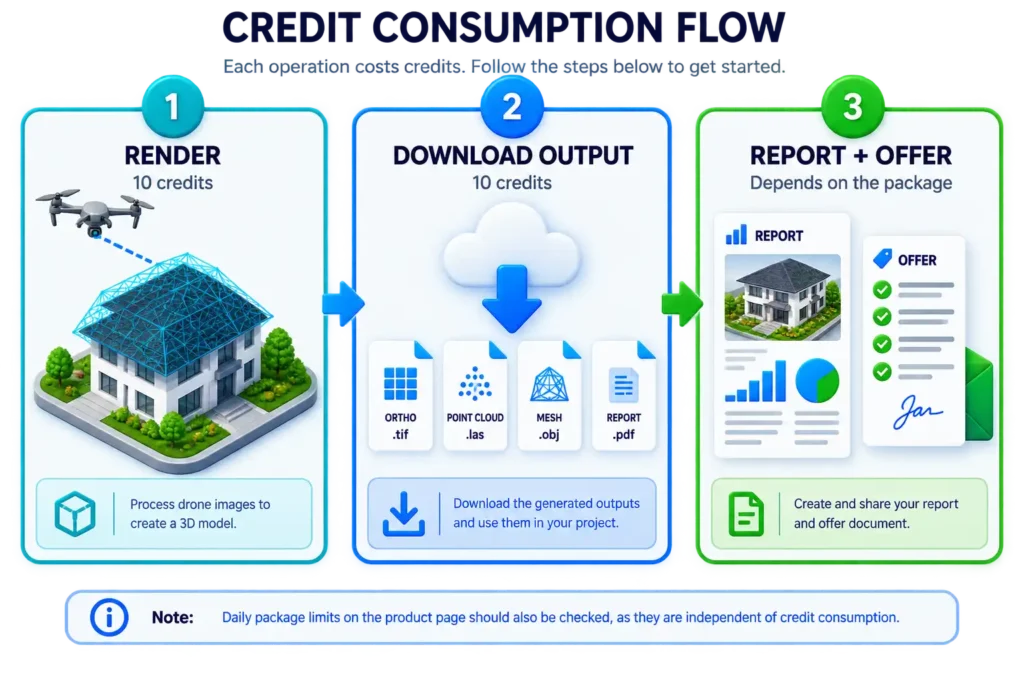
According to the supplied technical document, one render consumes 10 credits, and one output download separately consumes 10 credits. Additional credits can be purchased from within the app.
Current Package Structure
| Package | Credits / scope | Users / support | Reporting |
| Demo | Pre-rendered demo project; no credits included | No additional users; online support | Demo project report can be viewed |
| Starter | 60 credits/month; 6 3D renders or 6 file requests | 2 additional users; online support within 7 business days | Generate production reports by consuming credits |
| Basic | 200 credits/month; 20 renders or 20 file requests | 2 additional users; standard online support | Production reports consume credits |
| Premium | 1,000 credits/month; 100 renders or 100 file requests | 5 additional users; priority support | Production reports do not consume credits |
| Enterprise | Custom, per contract | Unlimited additional users; dedicated support | Per contract |
Additional Credits (Top-up)
Additional credits can be purchased from the credits area within the app. Payment is completed via the payment method on file for your account and the credits are applied to your account.
DATA SECURITY CORE PRINCIPLES
The security and privacy of your data is our priority.
- Account access Secure authentication and strong password policies.
- Encrypted data Your data is encrypted during transmission and storage.
- Authorized access Only authorized users can access the data.
- Privacy Your data is confidential and is not shared with third parties.
Our data security processes are continuously reviewed and managed in accordance with the latest standards.
Render-a’s public product information states that uploaded data is encrypted and protected via account access. This document does not assume a specific data retention period, server location, or KVKK/GDPR contract clause; the current Privacy Policy and contract documents should be treated as the source of truth for this information.